![Official Website for Dustin Miller PolyInnovator [LLC]](https://www.polyinnovator.space/content/images/2025/03/polyinnovator-logo-2024.png)


Every year they said it was "the year of the Linux computers", and never has that truly felt more true. People are moving from Windows to Steam OS (or at least Bazzite) in droves.
Windows is causing so many people to drop it for other distros/options, i.e. Zorin, Mac, or Cachy. If you were to want to emulate Iron man/Tony Stark, then you'd have to have a system capable of handing that level of complexity.

I kept thinking what would it be like if you had an Obsidian Operating System, as the app can handle most use cases you'd want via plugins. Now with agentic AI I would not be surprised if this will be the case very soon for some all in one users out there. Perhaps I'll be the bleeding edge person to lead the way, who knows.
Now this post will keep some of the Zorin influence, as the OS distro did leave a very strong impression on me. It was my first Linux experience as well, and I think most of you reading this may be coming from a Windows/Mac background, and so it would be the best to dip your toe in the water with.
However since I wanted to take a broader Linux focused approach with this post, then the Zorin ideas will take up simply one section instead of throughout the post. That way we can focus on the point without a particular Distro being the focal lens.
What is Linux?
It is an alternative operating system, founded on the mindset of being open and customizable. Now one thing you need to know, and it is a bit confusing. I'll do my best to explain it, although there are plenty resources out there that explain it more. Linux is the "core" of the OS, as in what is running in the backend.
When people say linux however it usually refers to the various distros out there, and each of them are different versions of linux. Different user interface elements, ways of interacting with the OS, and even different feeling entirely from an OS standpoint. If you were to look at Ubuntu versus Arch linux, it would feel like two different operating systems. More on this in a later section.
What is Obsidian?
It is simply a "note taking tool", but in reality it is far more than that. I started out using things like google sheets, then airtable, then notion in order to organize massive amounts of information.
When these new database tools took over excel-like tools, it was a game changer for me. Eventually people made plugins for Obsidian to make it into a project or task management tool. Later on still, the official Obsidian Bases came out, which revolutionized the app I'd argue. None of the other PM tools before really did the trick, maybe kanban lol.
The point I want to make here is that Obsidian is extensible, and you can add almost anything you can think of as someone probably already has.
It is a personal knowledge management tool, that I should note works really well with ai, and it can do so much more than notetaking.
Subnote: Obsidian is the best PKM tool, bar none.
However I am aware some people use Logseq or Acreom, which for the sake of this post technically can work for this as well. I tried both, and they failed to even hold a candle to Obsd, Acreom doesn't even seem to have been updated in ages, and Logseq took too long for their "DB version" to be a viable option.
Introduction: Embracing the Iron Man Approach to Technology
If you think about it Tony Stark is just a vibe coder 15 years before vibecoding, at least that's what the internet likes to joke about. Seriously though, he literally tells Jarvis to do "XYZ" for him, instead of him coding it himself, although we can assume that he coded Jarvis himself.
Thus it is not a lack of skill, but rather delegation. He could do it himself, but it would be faster if he had Jarvis do it. Mostly due to him focusing on other things, such as hardware (i.e. the Iron man suit).
I think this is the best approach to using AI, as you are simply using it to accomplish more. Not to replace your actual work, or at the very least fill in the gaps if you are missing a skill. I know not everyone will agree with that sentiment, but it is needed for this post to work.
Tony liked to get his hands dirty, so he would code, build, or do anything he needed to in order to finish the project.
What I think is curious is the integrated systems that each and every scene shows off. Especially in the early iron man films, before the various other appearances.
Just to quickly touch on that before moving on:
- He interacts with his computer via a futuristic, most likely linux RICE, operating system interface. Non-physical keyboard. Touch and hologram controls.
- He has an autonomous robot, that seems to have some sort of AI built into it, perhaps a precursor to Jarvis. It can move and do things on its own, and seems to react to him scolding it.
- Obviously his various armors that can do all sorts of stuff, and he can control it via voice and jarvis.
- Finally, the smart glasses, such as in iron man 3 or spiderman 1, where he is able to control his suit from afar.
How Obsidian Enhances Your Workflow on Linux
Now to be clear I think Obsidian works essentially the same on any operating system. Windows, mac, or linux... however I think linux gives you a bit more options when it comes to using ai agents. Technically there are alternatives to any tool on every platform. How well they work may vary though.
What I'm thinking is even something as trivial as the UI, I can make it transparent, and more minimalist on linux, whereas I can't on the other two (a little on mac but limited). Additionally, I can have it auto open on a particular workspace everytime I start my pc.
Then with tools like Eigent, Mimir, or OpenRecall, you can put together a really unified experience with your linux OS, that can interact natively with your obsidian vault.
Using AI agents
While yes I know claude cowork/md/cli/etc all are very useful, and they are quite popular to say the least.
I do NOT trust any ai company, and neither should you.
Obviously Gemini is a no go because Google is the epitome of untrustworthy, as the only company worse than them is Meta.
OpenAI has openly stolen people's data, works, and other sources of information. That is literally how they started, and while pretty much EVERY ai company has done that. They were one of the more egregious options, and Sam Altman tends to act more like a supervillain than visionary.
Meaning the only companies left are Claude, and the Chinese ones. Which if I'm being honestly those are a hell of a lot better than the ones in the US. I mean that both in raw performance, with Qwen or Deepseek outshining their western counterparts, but also in a trustworthiness standpoint.
They aren't profit motivated like OpenAI or Google are, even Claude to some degree, but what you do have to worry about is if the government there has any need to look you up. Then they can retrieve the information easily from the company. I think for most people that doesn't impact them.
Now to the point of this section: AI AGENTS.
These are autonomous workers for your tasks, think like a mini-jarvis, and don't believe what you've seen on short form vids. Those "Jarvis" projects people are showing off are mostly just claude wrappers with a pretty and vibe coded UI.
What you should think about is using agents with a local LLM on your own hardware, and trying to figure out how to get powerful enough hardware in this market.
Having them run locally also helps with interacting with your own hardware, something that Jarvis does all the time.
How does Linux work, and what are Distros?
Linux is the core, there's a middle layer for users and other backend systems (sometimes changes with the distro), and then there is the frontend (what you see). The interface, feel, and OS style is all the front end mainly. At least for the simplicity of this post.
Linux itself is the base operations behind it all, and people make their own distributions of the front half. Allowing people to devise their own experience, and do whatever you want with it. Someone even has made meme operating systems, or perhaps a customized looking one for a movie set, etc.
Distros are the various distributions that people have made for others to use. I mentioned Zorin a lot in this post, there's also Cachy that I like, and there are dozens more. When you first get into linux you really don't need to get into all of the details, I'd say pick an OS that looks like you could get used to it. If you want a visual way of seeing them: https://www.reddit.com/r/unixporn/
Overview of Zorin OS: Features and Benefits
Zorin is just a distro I personally think is best for a lot of people. Both newcomers and veterans alike. Mostly because it just works, anytime I hear about people trying out various linux distros, they're like "oh yeah my wifi didn't work" or the "touch screen". However on so many devices, everything has just worked for me out of the box for me on zorin.
Even techies that like to tinker, it might be best just to get something for a while that you don't have to constantly tweak or tinker.
Linux is made for both.
If you want to have all things just working out of the box, or if you want to tinker and get your hands dirty. Both are possible with different distros.
Why did I move onto Cachy + Niri?
Speaking of tinkering...
I was at that stage where I had been on zorin for a while, and while I might go back. The new appeal of a different style window manager, which is what your windows interface is sort of how it operates. I.e. dragging and dropping, versus a grid-like approach.
Niri was something I tried after trying to get Hyprland to work half a dozen times. Only for all six attempts (with different distros mind you) every single one failed. Niri however, which is very similar interface, worked out of the box. So much so that I initially had it on my test device, and then I installed it AGAIN. Did all the steps AGAIN, and had it working awesome.
I've had some things not work, like some hotkeys (which are important for a tiling interface like that). Given that it is a more keyboard focused distro. I need to fix that somehow, but with AI it makes it quick.
Will I go back, and what is the point of experimenting with distros?
Maybe, maybe not, the tiling window manager is growing on me, and with a laptop you have limited screen space. I want to be able to maximize my productivity, either at home or on the go. This is how I am able to do it.
Optimizing Your Productivity with Linux and Obsidian
Since the speed of linux, customization, and overall ways the interface works; They all help for speeding up my actual use of the platform. I'm even considering using a keyboard based plugin in obsidian, to go alongside the keyboard centric Niri system. Meaning my hands never would have to leave the keyboard.
Interacting with AI, and being able to extend the Niri interface with plugins on it too. Doing more deep integrations with my home server, my ai agents, and more. Stuff that just wouldn't be possible in the interfaces of mac or windows (maybe a little bit with the mac island bar, but limited).
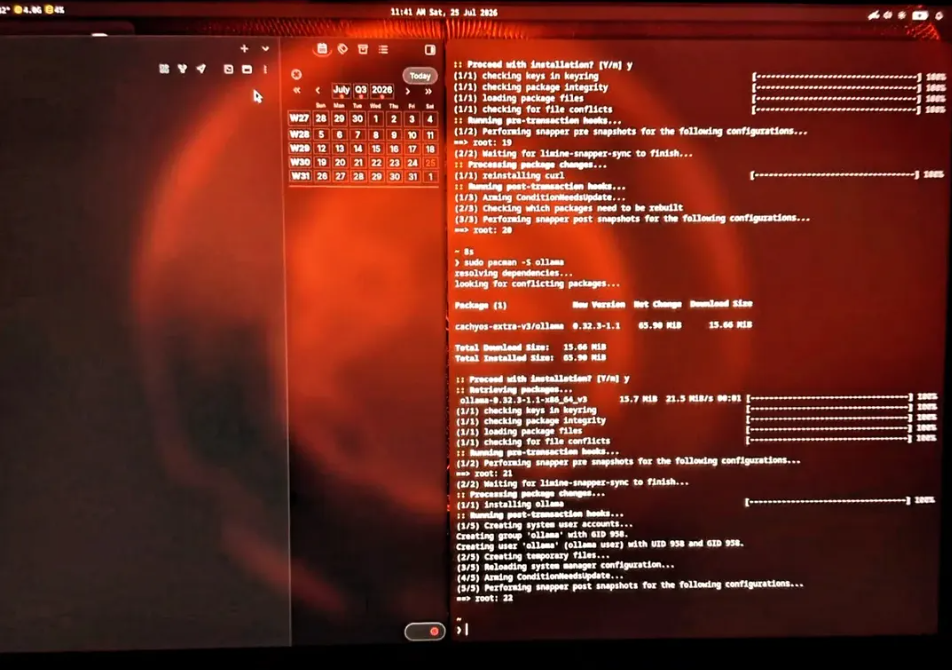
Not only are most linux distros multiple times faster than windows and mac, but they even have different ways of interacting with your apps. As I've mentioned before that delay between you starting an app, and then using it. Or even just switching between apps or workspaces.
Future Possibilities: Innovating with Linux and Obsidian
I love the idea of using linux as the core to an obsidian operating system.
With AI you can do even more with Obsd, and other operating systems limit you too much. Mac locks things down, and windows shoves copilot in your face. Both make it harder for you to integrate your own preferable AI (local or cloud) into your system more natively. Microsoft doesn't want you to replace copilot, even though it sucks. Mac just uses Gemini for its siri, so you're not good there either.
Linux lets you customize almost everything about it, at least if you pick the right distro. Given that Obsidian lets you do the same from the app standpoint. Put them together and you can create multiple bridges between both the app and the OS. Really creating that Jarvis like interface, and Iron Man OS.


