![Official Website for Dustin Miller PolyInnovator [LLC]](https://www.polyinnovator.space/content/images/2025/03/polyinnovator-logo-2024.png)


It even replaced my gaming computer, and is my all-in-one handheld.
There are many great devices out there like the SteamDeck, Retroid Pocket, and of course the barrage of PC gaming handhelds (including Lenovo's other ones). However what I think they are missing, is the versatility that the Switch offers.
While yes you can plug pretty much any handheld into a dock, and then into the tv. Even using an hdmi to usb-c cable if you want to simplify it. However the experience is not without hiccups, and the controls are locked onto the device. Meaning unless you use the cable idea, and are trying to do dual-screen emulation. It doesn't really make sense, and isn't the couch gaming experience you'd want.
What is great about the Legion Go 1/2 is that the controllers detach, something that most reviewers shrugged off as a gimmick. In my experience it is what makes the device so great. I have a steamdeck, a switch, a retroid, and they can't hold the candle to the Legion Go's power or the controllers working out of the box (switch can but super under powered).
Now because of this it allowed me to truly game. No longer was I fiddling with windows trying to resize them, or get the portrait screen on the device (something that was fixed in the Go 2) to work with games.
The 16:10 aspect ratio, and that it was a tablet screen repurposed (meaning in software it is rotated). Both of these things actually make the game compatibility a nightmare on Windows. Where some resolutions will work, others will not, even if the resolution will work it will randomly rotate on you. Etc.
Now this was JUST IN WINDOWS, as soon as I went over to Bazzite. None of that happened. I think the "worst" example is that on boot the couple lines of linux options at the top is rotated. That screen is only there for like 8 seconds, and then it boots. Meaning it isn't even a point worth making.
Are there issues with some resolutions with games? Yes, but that is mostly due to the processing power needed to run THAT game. Not any issues with the actual game window freaking out. I should say that this is in gaming mode, and I have had some issues with emulator windows being funky on the desktop mode. However any normal Linux app works just fine, and I am using the gnome interface. Thus if you go with the stock arch, then you probably won't deal with the same crap.
My point is even before actually getting into the post, is that for the Legion Go 1 Bazzite I think is the best choice for anyone on the market. Strong stance to take, and I'll try to back it up down below.
 Sean Hollister
Why I decided to Install it?
After a few months of the Go just sitting there most of the time, and the handful of times I pulled it out. There were often some sort of slowness, or issue with windows. Never got the full screen experience to work, even when I sideloaded it, and I had the insider builds.
When I played games most of the time it did feel like there was performance left on the table. Causing the device to struggle at playing a lot of the more higher end stuff I wanted to try out. I.e. Dead Island 2.
Eventually I tried dual booting windows and Bazzite, and over the next week I kept filling up the drive. I even dedicated the quarter of a terabyte micro SD card I had for it fully for Bazzite. I also filled that up too!
Tried to squish the windows partition, in exchange for more space with Bazzite, however the process broke my install. I could have figured it out, but instead I just wiped the drive and started fresh... fully with Bazzite.
Why it over others?
I tried Cachy on my NUC, it was mediocre. I looked into Chimera, and it didn't seem to hold much of a candle to Bazzite. I love Zorin OS, but I am unsure if I could get the gaming up to par with it. Even if I did the whole proton route, and set it up well. It would still lack that steam interface, that makes gaming so easy on the Bazzite experience.
How has it been?
I have found myself gaming a lot more, and even trying new stuff that I had been putting off. I have roughly 100ish games on Steam, and around 90 on Epic Game store. The two main stores on the PC landscape, which I would follow that with Microsoft/Xbox after. However you can't access the latter on Linux unfortunately, so some of my games are not able to install.
Most of my games are able to be installed, and after a bit of tinkering with the Heroic Games launcher, I was able to get Epic Games to work, and GoG if that matters.
Emulation and retro gaming is also superb as well! Installing Emudeck was a bit of a process, and I could barely get the steam rom manager to function at all. Although with a bit of patience when it came to the file explorer, and the desktop experience (gnome is what I chose, maybe was a mistake). I eventually got everything ported over. There are even some cool open source re-renderers/remakes for older games like Diablo 1, Serious Sam, and Morrowind. That make those games easier to play, such as with OpenMW which gave me controller support for example.
Note: When it comes to Diablo 2 and 3 (I guess 4, but I don't have it), the Battle net store is difficult to get on Linux/SteamOS. However the PC versions also don't have controller support for some reason, so it is actually better to simply run the Switch versions for better controls on a handheld.
How easy was it?
Now I should mention that I am a bit of a tinkerer. There are times where figuring things out is part of the fun. Though there are times where the tedium becomes too much. I had that issue with Windows, which is why I switched.
Was it out of the box working? No, but I did go into it knowing that to be the case. It wasn't too much to set up, you need to log into steam of course, and there are things you need to install on desktop mode. All of which are just simply setting things up, and isn't really that hard. Most video guides out there explained it all really simple, and they are what I used too.
Things like EmuDeck, Decky Loader (must have), and Heroic Game Launcher. Honestly, if you have those three, then you'll probably be set.
- EmuDeck gives you an organizational structure for all of your emulators and roms for retro games. Most of the emulators are also installed for you, and if you need others you can install via the store built into this Linux distro, or go to the GitHub page for the emulator. Note: downloading roms is illegal, and so you have to be bringing your own of course.
- Decky Loader gives you needed control over your device, such as greater TDP control, more customization like with startup video or system sounds, audio control, and more.
- Heroic game launcher like I mentioned earlier in the post is for playing Epic/GoG games.
How has it changed the overall experience?
While I can't really just put a game to sleep and start it back up like on Steamdeck. Which a lot of you going in might think that to be the case. That is mainly due to the controllers, and the Legion Go 1's poor battery performance.
I will say the battery runs a bit longer on Bazzite from what I can tell, but you still only get 2-3 hours on a medium to run game.
The controller issue I think is due to the fact that they are detachable. I have no issues connecting it to the console, even when detached. However coming back from sleep often causes the controller to not be recognized by the game. At all.
Meaning you have to close out of it to restart the game. The OS has no trouble at all detecting the controller even from sleep I should mention. Also note that I have tried the "Pause Games" plugin too in order to help with the detection of controllers (it didn't help).
Besides that relatively minor issue. I think the overall experience is a LOT greater, and I actually find myself playing games a lot more often.
OH!
A HUGE HUGE HUGE thing for me that was a change from Windows to Bazzite... is the external screen situation. Whenever I plugged the handheld into a monitor or TV on Windows I had nothing but trouble, even on a monitor, which took a minute to set up. On my living room TV I had even more trouble. Firstly, detecting it, and then secondly trying to optimize the resolution disparity between internal screen and external screen.
Whereas on Bazzite it was the complete opposite experience. Things just worked right out of the box. It doesn't seem to support ultrawide, but I don't intend on using it on this monitor very much.
I was worried that plugging it into my 4k TV would cause it to try and run at too high of a resolution. However it seems to have just kept the same settings as the internal screen, which is ideal so that it runs at the expected capacity.
External GPU
I almost forgot this section, and for reference my eGPU is the Boostr01 (from the Herk mini pc brand IIRC).
Now to my knowledge it should work just fine, but I haven't been able to get it to function yet.
Either on windows or on Bazzite. I think Bazzite did a better job at detecting the eGPU, at least on desktop mode. However I wasn't sure how to get the device to use the eGPU instead of iGPU when it came to games.
Windows I've had mixed results. Even with my Herk Orion Mega mini pc that I had for a while. I had gotten sent the eGPU to test with it, and it didn't work at all. Back then too you had to use DDU to uninstall drivers, and reinstall drivers for the other GPU (over and over) in order to get it to work.
I think now AMD Radeon software can detect both GPU's, and should work. However it too had a hard time on Windows with the Legion Go.
Truthfully I was hoping to use the eGPU, and keep my Dual Boot setup. That way I could have my Bazzite gaming experience, as well as professional/content creator windows experience.
Retro Gaming
I have gotten around to many more games because of this device, even playing Zelda Oracle game randomizers, which I know this device is overkill for those type of games. However being able to just easily plug it into the TV, and have it on the go is really nice.
Granted i could have done that with the Retroid Pocket and the Retroid Dock too I guess.
I considered installing Batocera on this device, but that seemed a bit too underwhelming for the power this device can use.
Cool idea: Using it as a mobile multi-streaming device!
This is more so if you keep windows on it, but it can be a really awesome mobile recording studio. Taking it to conferences, and events, then using it to record in person podcasts.
Plenty of multistreaming tools too that are only on PC, not on mobile, and so it could make a huge leap for some creators. Although I can't think of any way to mount it for use with camera rigs. Only a tablet clamp, but that would have to be measured.
 Dustin Miller | PolyInnovator
What are the pros and cons?
These are more than likely going to be more personalized for myself, and so I hope they help you decide. Although just wanted to clarify that these are more subject to my own opinion!
Pro: Powerhouse in a SFF
As I alluded to before the Legion Go was about the same specs as my mini pc I had (the herk orion mega). Just different ram and storage amounts.
Meaning you could easily use this as your daily device if set up right, and having the right accessories. I.e. my favorite being this JSAUX Docking Station.
You can game, video edit, and browse the web. Plus its portable!
Con: 90 Degree Rotated Screen + Aspect Ratio* Issues
Now the aspect ratio CAN be a pro, as it increases the amount of screen you have to see games. However because of it I did have issues with some games on windows. If I didn't have issues with the ratio, then the screen rotation would cause issues.
One or both would cause some games to freak out, one in particular surprisingly was Octopath Traveler 2. Another being State of Decay 2.
Changing resolution in game solved most issues, but it was annoying.
Pro: Detachable Controllers, Port locations, and robust kickstand
These are simply quality of life, but I think they're worth mentioning. The detachable controllers may not seem like much to you, but to me they are GREAT. Not only have I ALWAYS wanted to have a PC gaming experience with split controllers. Even going as far as to get the Asus EEE stick controllers back in the day.
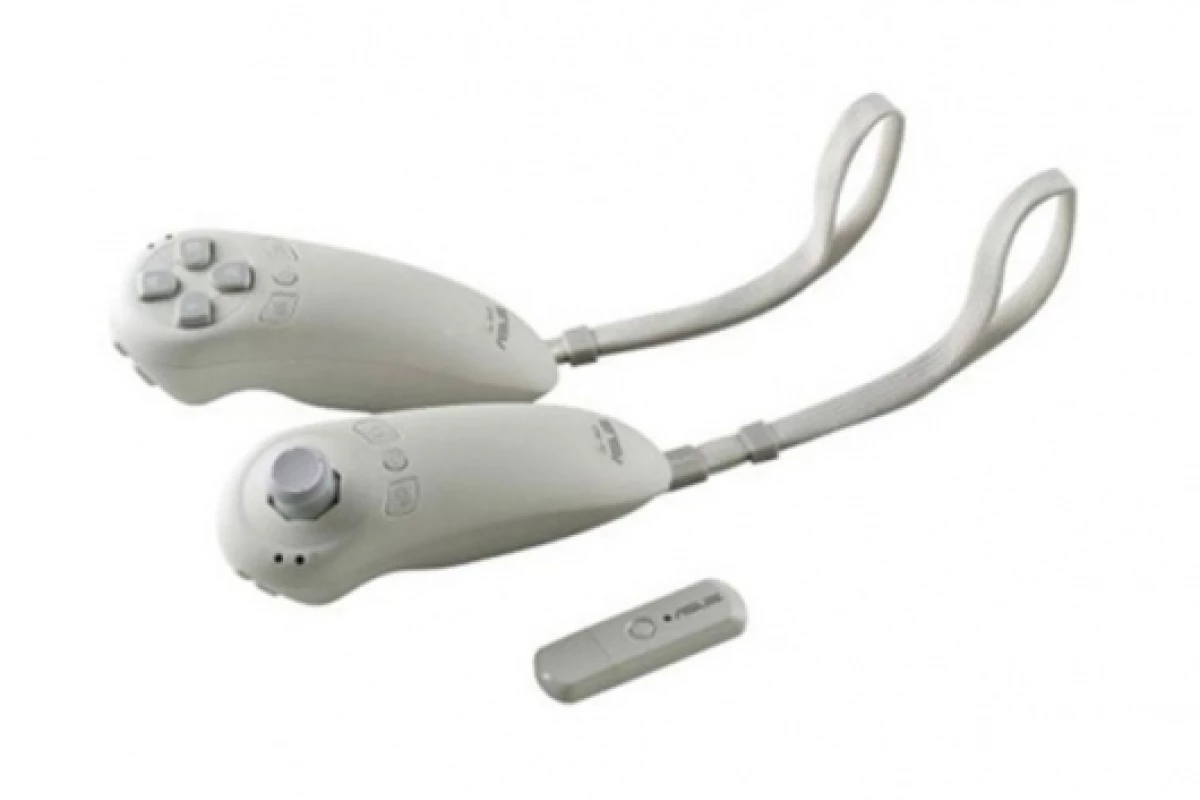
Thus the Legion giving me my dream for that kind of control. I haven't gotten motion control to work, but to be honest the comfort of splitting up my hands makes up for it.
The ports are actually laid out well, and having one usb on the top and bottom is better than other handhelds. Either having only one port, or having both ports on the top (ew).
Finally, the kickstand is really sturdy. It is even resting on my desk right now in sleep mode using the stand, and it helps when laying in bed as well!
Con: Egonomics, Weight, and Battery
These are things that many reviewers have complained about. I have only experience minor discomfort when it came to the ergonomics or weight. To be frank I think its overblown in the videos.
The one gripe I have that is warranted in those videos would be the battery doesn't last very long in a real gaming session. However playing it on the TV with a dock solves that, and you can always use a portable battery bank when traveling.
Also I've heard of some people getting after market batteries too as replacement.
Why do I think it is the Best!
Saying that it is the best is a strong stance to take. Many emulator fanatics would say AYN Thor. Many ergonomic, or xbox, users would say the ROG Xbox Ally X. The rest might say you should go with the Go 1's successor, the Go 2, but that is TWICE the cost (at least).
Even disregarding the skyrocketed cost of RAM and Storage, which increased the Go 2's cost dramatically. The original MSRP cost of it was still DOUBLE what you could get the Go 1 for, and not for that much more performance. Also the size difference makes it even harder for some people to use.
Not to mention if you wait around you can often find a deal on marketplace or bestbuy open box to get one for roughly $500. I even traded my gaming console for mine actually.
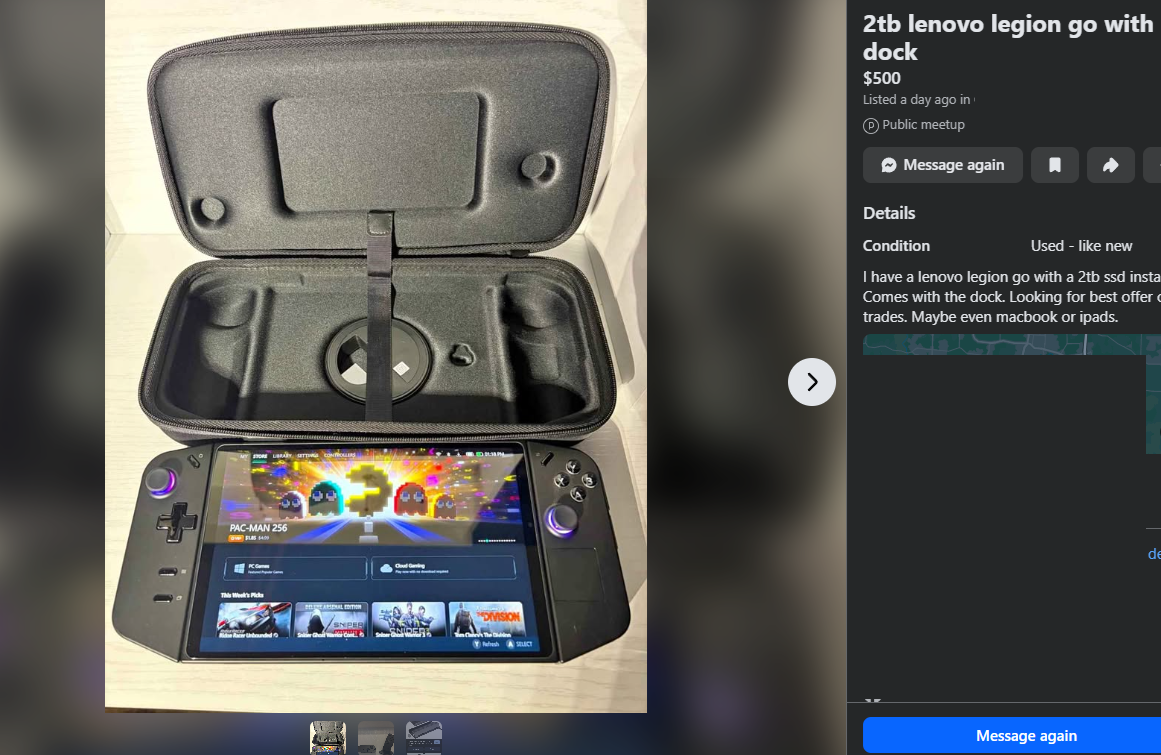
All in all, I think that the Go 1 is the best bang for your buck. The detachable controllers come in handy way more than you would think. Not to mention having the option to have mouse mode is actually helpful in a pinch.
To me the ergonomics are THAT bad, as people make it out to be, just maybe a bit heavy at times (even for someone that works out lol).
The screen looks GREAT, but on windows there was hell with the aspect ratio, as well as the 90 degree rotation. That you don't get on the Go 2.
Let me know what you think!


